


Bifocal glasses give you clear distance and clear reading in one lens.
Presbyopia usually shows up after 40, and it makes near tasks feel suddenly harder. Many wearers then face a real choice: bifocal lenses, progressive lenses, or multiple pairs. If you buy or supply lenses in volume, that choice also affects remake rate, adaptation complaints, and product mix.
In this guide, you’ll learn what bifocal glasses are, how they work, and how they compare with progressives. I’ll also share a practical decision framework, tables you can scan fast, and fixes for common problems. If you’re a B2B buyer, you’ll see how to position each option for different customer profiles.
What Are Bifocal Glasses?
Bifocal glasses are eyeglasses with two distinct optical powers in one lens: distance on top and near on the bottom.
They mainly address presbyopia, the age-related reduction in near focusing ability. Clinically, presbyopia affects nearly all adults as they age, so demand is broad and predictable. From a product standpoint, bifocals are a “two-distance solution,” not an all-distance solution.
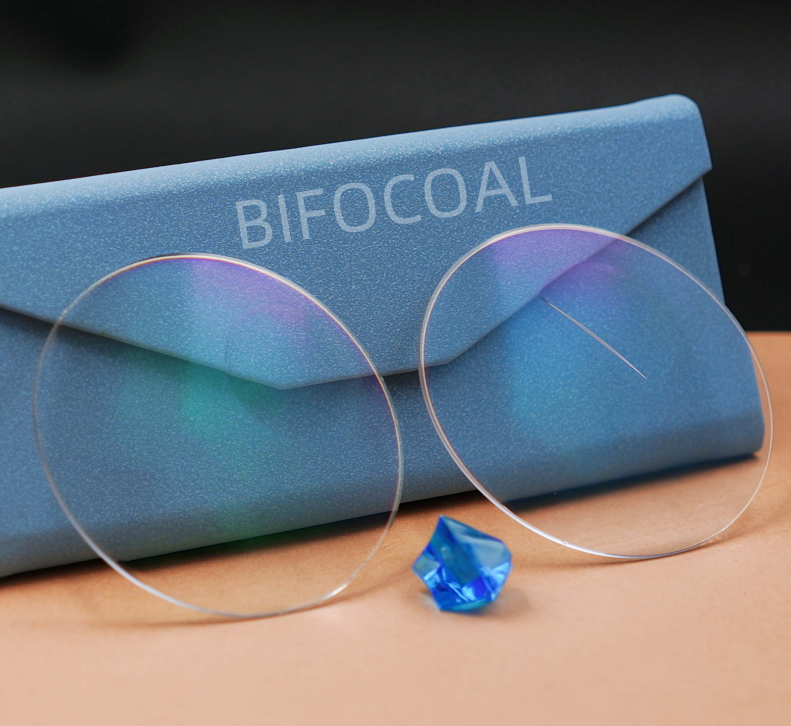
Definition: Bifocals / Bifocal Lenses / Bifocal Eyeglasses
Bifocals are bifocal lenses with a visible segment line that separates distance vision from near vision.
Common search terms in this cluster: • bifocals • bifocal glasses • bifocal lenses • what are bifocal glasses • what is bifocal eyeglasses
For content and SEO, treat them as the same intent: “two powers, one lens.”

Who Are Bifocal Glasses For?
Bifocal glasses fit wearers who live mostly in two distances and want a clear reading zone.
Typical “good fit” profiles: • Strong readers: paperwork, books, labels, receipts • Drivers who also need quick close-up checks • Wearers who want a crisp boundary instead of a corridor • People who prefer predictable aiming (“top for far, bottom for near”)
Typical “not ideal” profiles: • Heavy computer users with long screen sessions • Wearers who want smooth distance changes for all-day mixed tasks • Anyone who strongly dislikes a visible line
When you match the lens to the daily distances, satisfaction rises fast.
What Bifocal Spectacles Correct: Distance + Near in One Lens
Bifocal spectacles correct distance and near vision in the same lens.
They work well for these task mixes: • Driving + reading navigation or a phone • Shopping + checking price tags + texting • TV + reading
They struggle for intermediate tasks: • Desktop monitor distance • Cooking while reading mid-range screens • Music stands and some workshop tasks
That “intermediate gap” is the biggest reason people switch to progressives later.
How Do Bifocal Lenses Work?
Bifocal lenses work by placing two prescriptions into two zones, so you “aim” through the zone you need.
You do not get a gradual blend of power. Instead, you get an immediate change when your gaze crosses into the near segment. That is why fitting and segment height matter so much for comfort and complaint reduction.
Two-Zone Design Explained (Distance Zone vs Near Segment)
A bifocal lens has: • Distance zone (upper area) • Near segment (lower area with “ADD” power)
Key fitting terms that affect outcomes: • ADD power (near boost) • Segment height (where the near zone starts) • PD and fitting alignment (where the optics sit relative to the pupil)
Small fitting errors can look like “wrong prescription” to the wearer.
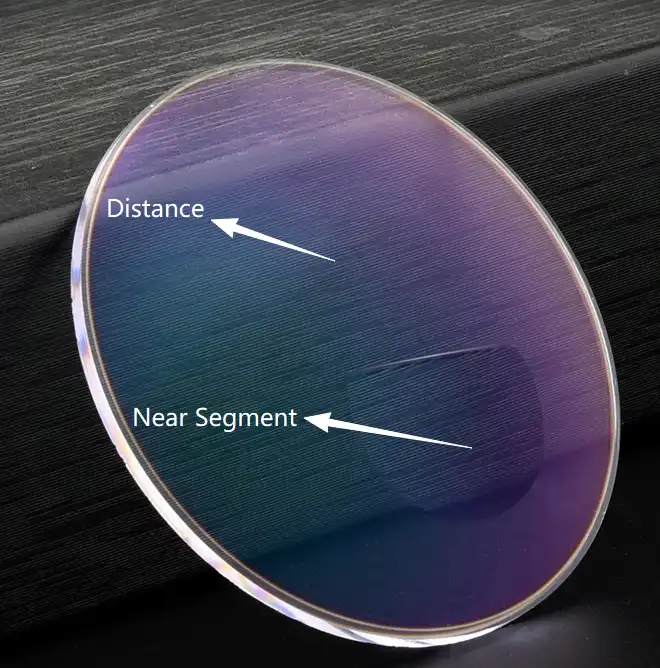
What You See Through Each Zone in Real Life
Use this aiming guide: • Distance zone: walking, driving, TV, meetings • Near segment: reading, phone, close inspection • Screen distance: often intermediate, so bifocals may force chin-up posture
If a wearer tilts their head back to see a monitor, the design is mismatched to the task. That is not a “bad lens.” It’s a distance-planning issue.
Image Jump: What It Is and Why It Happens
Image jump is a sudden shift in image position when the gaze crosses into the bifocal segment.
Some wearers barely notice it; others feel it immediately on stairs or curbs.
What reduces perceived jump in real life: • Accurate segment height and stable frame fit • Patient education (where to look while walking) • Segment design selection based on habits
Types of Bifocal Lenses
Bifocals come in multiple segment styles, and style changes how the near zone feels and how transitions behave.
If you sell lenses B2B, segment choice is a portfolio decision. A narrow near segment drives complaints for heavy readers. A wide near segment may trade cosmetics for function.
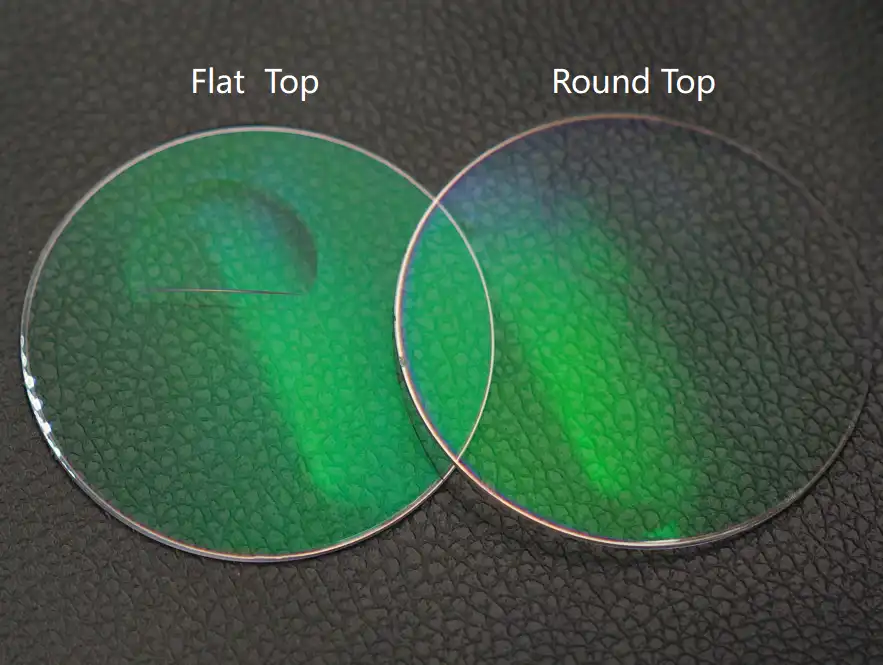
Flat-Top / D-Seg Bifocals
A practical default for many wearers because it balances near width and usability.
| Item | Flat-Top / D-Seg Bifocals |
|---|---|
| Best for | Reading-heavy daily use, first-time bifocals |
| Pros | Wide near segment, easy aiming, common availability |
| Tradeoffs | Visible line, possible image jump, limited intermediate |
Best For
• Paperwork, book reading, close inspection • Wearers who want a larger near area • First-time bifocal users who want a familiar design
Pros
• Wide, stable near zone • Fast learning curve for most wearers • Efficient for two-distance routines
Tradeoffs
• Visible segment line • No built-in intermediate corridor • Some users notice jump at the segment boundary
Round-Seg Bifocals
Often chosen for a smaller segment shape, but it can increase perceived jump for some users.
| Item | Round-Seg Bifocals |
|---|---|
| Best for | Smaller segment preference, specific frame/aesthetic choices |
| Pros | Compact segment appearance |
| Tradeoffs | Smaller near field, can produce more jump in practice |
Best For
• Occasional near tasks • Wearers who prefer a small segment look
Pros
• Segment looks compact • Can work for light reading needs
Tradeoffs
• Near zone can feel tight for long reading • Round segments can produce more jump for some wearers.
Executive Bifocals
A wide reading solution with a strong “near across the bottom” feel.
| Item | Executive Bifocals |
|---|---|
| Best for | Heavy reading, wide close work across lens width |
| Pros | Very wide near zone |
| Tradeoffs | More visible line, still no true intermediate vision |
Best For
• Long reading sessions • Close inspection work that benefits from a wide field
Pros
• Near spans the full width • Easy to find near without hunting
Tradeoffs
• Segment line is highly visible • Intermediate distance remains limited
Other Segment Styles (Ribbon / Specialty)
Use specialty segments when a specific task or fit requirement justifies the design.
| Item | Specialty Bifocal Segments |
|---|---|
| When to consider | Unique habits, occupational needs, prior wearer preferences |
| Benefit | Segment size/position customization |
| Tradeoffs | Fit-dependent, needs accurate measurements |
When to Consider Them
• The wearer already knows what segment works for them • A standard segment causes recurring dissatisfaction • A professional fitting confirms the design choice
Pros and Cons of Bifocal Glasses
Bifocals deliver strong value when the daily routine truly centers on distance + near.
If the wearer lives on screens or constantly changes distances, progressives often win on comfort. Use the tables below as a fast decision aid.
Benefits of Bifocals
| Benefit | Why it matters |
|---|---|
| Wide near zone | Less “searching” for the reading area |
| Simple aiming | Easy habit: top for far, bottom for near |
| Stable near clarity | Consistent reading performance |
| Predictable expectations | Fewer surprises if educated correctly |
Limitations of Bifocals (Visible Line, Image Jump, No Intermediate Zone)
| Limitation | What the wearer may notice |
|---|---|
| Visible line | Cosmetic concern for some |
| Image jump | Step-like shift at the segment boundary |
| No intermediate zone | Computer distance discomfort for long sessions |
| Fit sensitivity | Segment height and frame stability matter |
Bifocal vs Progressive Glasses
Both designs treat presbyopia, but they solve it in different ways.
Bifocals give two clear zones with a hard boundary. Progressives provide multiple distances with a gradual power change and no visible line. Your best results come from matching lens design to real daily distance patterns.
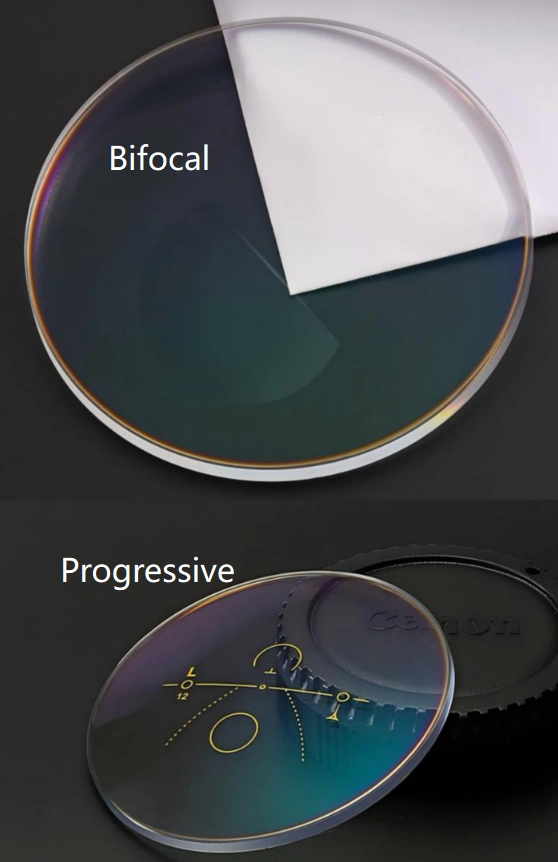
What Are Progressive Lenses?
Progressive lenses provide three zones—distance, intermediate, and near—without visible lines.
That intermediate zone is the key advantage for computer work.
Progressives can require adaptation because of corridor use and peripheral blur. Many wearers adapt well, but not everyone loves the early feel.
Key Differences (Zones, Appearance, Adaptation, Intermediate Vision)
Use this quick scan: • Bifocals: two zones, visible line, strong near segment, limited intermediate • Progressives: three zones, no line, intermediate included, adaptation sometimes needed
Bifocals vs Progressives Comparison Table
This table is designed for fast scanning and buyer conversations.
| Feature | Bifocal Glasses | Progressive Lenses |
|---|---|---|
| Vision zones | Distance + near | Distance + intermediate + near |
| Lens line | Visible | No line |
| Near work | Wide segment | Corridor-based near |
| Computer use | Often uncomfortable | Usually better (intermediate zone) |
| Adaptation | Often straightforward | May take time |
| Common complaint | Image jump | Peripheral blur early |
Bifocal and Progressive Glasses: Which One Fits Which Lifestyle?
Match the lens to the day, not the label.
Best-fit pairings: • Reading-heavy + short screen time → bifocal glasses • All-day desk work + meetings + phone → progressive lenses • Mixed needs → progressives, or bifocals + a dedicated computer pair
How to Choose the Right Option (Decision Framework)
If you answer four questions honestly, you can choose fast.
-
How many hours per day do you use a computer?
-
Do you care about a visible line?
-
Do you read for long sessions?
-
Do you want one pair for almost everything?
Your distance mix is the decision. The lens name is secondary.
Choose Bifocal Glasses If…
• Your day is mostly far + near • You want a wide, stable reading zone • You prefer simple aiming over corridor learning • You do not depend on intermediate vision for work
Choose Glasses with Progressive Lenses If…
• You use a computer daily • You change distances often • You want no-line aesthetics • You accept a short adaptation period
If You Use a Computer Daily: What to Do About Intermediate Distance
Intermediate vision is where most disappointment starts.
Practical options: • Choose progressives to include intermediate vision in one lens • Keep bifocals for general life + add computer glasses for desk work • Consider occupational/office designs if your portfolio supports them
If you sell B2B, this is a portfolio play: one design rarely wins for every buyer.
Fitting Factors That Change Comfort (Segment Height, Frame Size, PD)
Fitting quality can decide success more than lens design.
Use this fitting checklist: • Confirm segment height in natural posture • Choose frame depth that supports usable zones • Verify PD and alignment before edging • Check frame stability (slip causes constant aiming errors)
If a buyer reports remakes, segment height and frame fit should be your first audit.
Getting Used to Bifocal Glasses
Most wearers adapt faster when they wear bifocals consistently and use correct aiming habits.
If someone “tests” bifocals for five minutes, then swaps back to old glasses, adaptation slows. Early discomfort often reflects habits, not a defective lens.
First-Week Adaptation Tips
• Wear the glasses for real tasks each day • Point your nose at the target, then move eyes into the correct zone • Use the distance zone for walking and stairs • Use the near segment for reading and phone checks
Reading, Walking, and Stairs: What to Expect
The segment boundary feels obvious at first for some wearers.
For older wearers who walk outdoors often, use extra caution on steps and curbs. Some research links multifocal glasses to falls risk in certain active older groups, so counseling matters.
When to Go Back for an Adjustment
Go back if any of these persist after consistent wear: • You can’t find the near zone without lifting your chin • Headaches continue beyond the first adjustment period • The frame slides and shifts your aiming point • Distance or near blur feels constant
A small frame adjustment can solve “big” complaints.
Common Problems and Quick Fixes
Most problems have a practical cause and a practical fix.
Start with aiming and frame fit. Then confirm whether the wearer needs intermediate support for screens.
Blurry Near or Distance
Common causes: • Near blur: reading through the distance zone • Distance blur: frame sits low or slips • Constant blur: prescription or fitting alignment needs review
Quick fixes: • Raise/secure the frame fit • Recheck segment height and PD • Confirm ADD power matches near demand
Headaches or Eye Strain
Common causes: • Forcing the wrong zone for screen tasks • Poor alignment or unstable frame positioning
Quick fixes: • Confirm fitting measurements • Consider progressives or computer glasses if screen time is heavy
“Swimming” Feeling or Distortion
Bifocals typically produce less “swim” than progressives, but the boundary can feel odd early.
Quick fixes: • Slow down gaze shifts across the line • Keep your head movement natural at first • Check that the frame does not tilt or slide during wear
Trouble at the Computer
If the wearer tilts the head back to see the monitor, the lens is not supporting intermediate distance.
Fix options: • Progressives for built-in intermediate vision • Dedicated computer/office lenses • Adjust monitor height and viewing distance
FAQs About Bifocal Eyeglasses
What Are Bifocal Glasses Used For?
Bifocal glasses help people with presbyopia see distance and near clearly in one pair.
They work best when the day is truly “two-distance,” such as driving plus reading.
Are Bifocals Better Than Progressives?
They are better for some lifestyles, not all.
Bifocals often win for reading-heavy routines and simple aiming. Progressives often win when intermediate vision matters daily.
How Long Does It Take to Get Used to Bifocals?
Many wearers adapt within days to a couple of weeks with consistent use.
If problems persist, you should recheck segment height and frame stability. Those two fixes solve more issues than most people expect.
Do Bifocals Work for Computer Use?
They can work for short sessions, but they often fail for long screen days.
Most monitors sit in an intermediate range, which progressives support better. If a wearer is desk-based, a dedicated computer pair can be a smart second solution.
What Is Image Jump and Can It Be Reduced?
Image jump is a sudden shift when the gaze crosses into the segment.
You can reduce it with: • Accurate segment height • Stable frame fit • Education on stairs and walking habits • Segment selection that matches wear behavior
Can You Wear Bifocals All Day?
Yes, many people wear bifocals all day.
For active older wearers outdoors, a distance-only pair for walking can reduce risk in some cases, with appropriate counseling.
What Frames Work Best with Bifocal Lenses?
Frames with sufficient vertical depth usually work best.
A shallow frame can crowd the near segment and reduce usable zones. A stable fit also matters because slipping changes aiming and increases complaints.
Final Recommendation
Bifocal glasses remain a strong presbyopia solution when your day is truly distance + near. If your routine is mostly far vision and reading, bifocal lenses often feel stable and easy to use. If you spend long hours at a computer or switch distances constantly, progressive lenses usually deliver a smoother all-day experience.
Request Specs & Wholesale Support
Tell us your target market (age group, usage scenarios, price tier) and your preferred lens mix (bifocals, progressives, or both).